
Save the last 180 seconds
Download a recent live moment on demand, with a duration, resolution and format you choose.
Find it in: Toolkit/Player/Quick replay
Set it up once
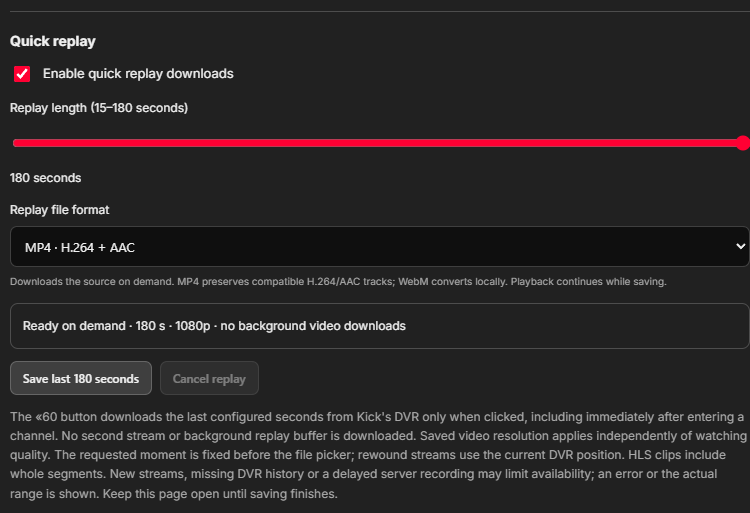
Enable quick replay downloads
Open Player > Quick replay and turn on Enable quick replay downloads.
Choose the duration
Pick 15-180 seconds. The default is 60; the player button displays the configured number.
Choose saved resolution and format
Saved video resolution is independent of playback. Replay file format offers WebM or MP4.
- Duration15-180 seconds
- How far back the requested replay extends.
- Saved video resolutionCurrent playback or an offered target
- Choose a sharper save without changing a small preview.
- Replay file formatWebM or MP4
- Conversion depends on browser codec support.
Save a moment
Click the replay button
Use the double-chevron button with the number in the native player. It works in the main stream and additional Multiroom tiles.
Choose the local file
Allow the requested media host when needed and use the browser's file picker.
Watch the status
The compact save notice shows discovery, waiting, download and conversion. Keep the Kick page open until it finishes.
 Enlarge
Which moment gets saved?
The requested moment is frozen when you click. Waiting for a file picker or retry does not silently move the clip to a later moment. A rewound player uses its DVR position; a paused player uses its last observed position.
Waiting, retries and cancellation
Kick's growing DVR may trail live playback. After a save request, UltimateKick can wait up to 45 seconds for the frozen moment. It does not keep polling or recording media while replay is idle. Temporary failed media requests get bounded retries; Cancel stops the work and pending waits.
Common questions
Does enabling replay continuously record my streams?
No. Media is read on demand when you request a save.
Can I save more than 180 seconds this way?
The replay control is limited to 180 seconds. For longer material, use a supported VOD download or start a recording.
Can it resume after closing the page?
No. Keep the owning page open until saving and finalization complete.
Written for version 1.1. Some controls may be unavailable in an earlier installed release. See release notes.