
Cards, filters & readability
Open local user cards, keep private notes, highlight useful messages and reduce visual noise.
Find it in: Toolkit/Chat
Open and pin user cards
Click a username
Use native chat, Mix or a participant entry. Open user cards from @mentions adds complete clickable mentions.
Keep the actions in context
Inspect observed history, tag a username into its channel draft or use the private note. Native profile details appear only when available.
Pin an important card
Up to four pinned cards stay open through ordinary panel closing and Escape. Move or resize them; X closes a pinned card too.
Keep notes private
A note is your own local annotation for a user, not a message sent to that person. Save feedback confirms the local change. Notes are part of supported preference backups; chat history and native profile artwork are not.
Filter and highlight deliberately
Use personal user/phrase filters and highlights to change your own view. Role highlights can distinguish badges such as moderators or subscribers where those badges are present. A personal filter does not ban anyone from Kick.
Right-click a message for copy, local hide or user-card actions. Shift + right-click keeps the browser menu. Link previews from supported services load only after your Load preview action; use Open original for other links.
Make chat easier to read
- Text and timestampsChoose in Chat
- Adjust readability without changing the stream.
- Chat quick control sizeSmall: 28 px / Compact: 24 px / Kick default
- Size Reply, Pin, Delete and enabled additional message buttons.
- Emote zoomClick emotes to open a larger preview
- Uses the native or enabled provider image.
- DanmakuOptional horizontal or vertical display
- Shows new chat over video with configured presentation.
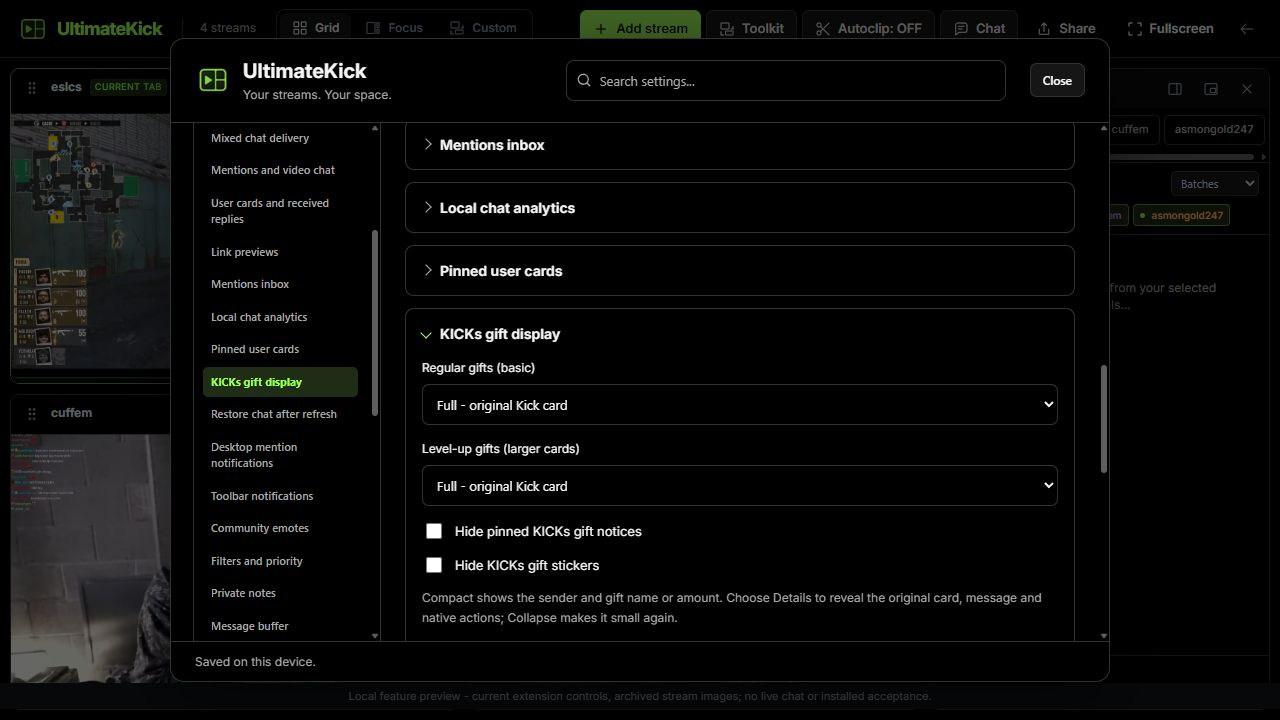
KICKs gift display has separate Regular gifts (basic) and Level-up gifts (larger cards) choices: Full, Compact or Hidden. Full keeps Kick's card. Compact shows sender and gift name/amount; Details reveals the original card and actions, and Collapse makes it small again. Hide pinned KICKs gift notices and Hide KICKs gift stickers are independent. Unknown layouts stay visible. Gift sending remains available; artwork may still download.
 Enlarge
Common questions
Can a card show messages from before I opened chat?
Only observed local activity and any explicitly restored sample are available. It is not a remote user transcript.
Are pins saved after reload?
No. Pins and their positions belong to the current page.
Does Tag username submit the message?
No. It appends to the intended native draft and leaves submission to you.
Choose public profile details
Allow public profile details in user cards
Starts off. Choose Load public profile on a matching card explicitly.
Read available fields
Biography, public links and own-channel follower count are labelled separately from the native Followed date. A missing field is unavailable, not zero.
Close or clear
Bounded reads/cache stay in RAM; navigation, disable or closing cancels stale work.
Load a supported link deliberately
- Allow YouTube previews / Allow Streamable previewsIndependent choices
- A permitted provider still requires Load preview; opening a link panel starts no media.
- Link preview sizeCompact / Wide
- Affects the movable panel, not native chat text.
Load preview contacts the selected provider. Stop, close, provider-off or page hiding releases media. Unsupported providers remain ordinary Open original links. Escape closes the panel and returns focus.
Written for version 1.1. Some controls may be unavailable in an earlier installed release. See release notes.