
Rewind & catch up
Rewind available live history, return to live and choose careful recovery for persistent playback errors.
Find it in: Toolkit/Player
Rewind a live stream
Use the seek buttons
Click -10 or +10 in the player's controls. Set Seek step (seconds) in Player to change both buttons.
Click again when you need more
Rapid clicks add up even while the previous seek is loading. Each player keeps its own destination.
Return with Go live
Go live returns a rewound player to Kick's native live source.
Understand the available history
Live rewind uses Kick's available DVR timeline. If a stream has no usable native DVR, only its actual downloaded buffer is available. VODs and clips use their own durations. A button stops at a real boundary rather than inventing extra history.
Read delay and catch up gently
Show a live buffer-delay indicator adds an approximate distance to the newest downloaded video. Wide players display the badge; smaller players put the information in the Go live tooltip or statistics. It is not the broadcaster-to-viewer delay or a network ping.
Gradually catch up near the live buffer edge can gently speed up playback near live. The compact speed control opens an upward menu with rates including 5x and 10x. Move into the menu to choose a rate; it remains open when the native control bar hides, including in Multiroom. Escape or an outside click closes it. A manual choice turns automatic catch-up off. The same controls remain available in Toolkit. DVR loading... means a seek is pending; a newer seek or Go live replaces that destination rather than waiting for it.
Recover a persistent error
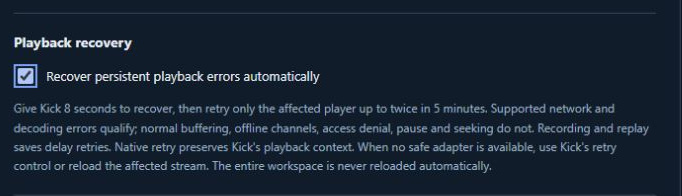
Enable playback recovery
In Player, enable Recover persistent playback errors automatically.
Allow native recovery first
UltimateKick gives Kick 8 seconds, then retries the affected player at most twice in 5 minutes for supported network or decoding faults.
Use native retry when needed
If there is no safe retry adapter, use Kick's own retry control or reload that stream. Other workspace tiles are not automatically reloaded.
 Enlarge
What recovery leaves alone
Will catch-up find footage Kick never made available?
No. Catch-up and rewind stay within the available source and timeline.
Will recovery reload the whole workspace?
No. It targets a supported affected player; unsupported cases need your native retry action.
Written for version 1.1. Some controls may be unavailable in an earlier installed release. See release notes.