
Detection rules & diagnostics
Understand the analysis period, distinguish growth from ordinary busy chat and tune rules using real examples.
Find it in: Toolkit/Autoclipping/Detection / Diagnostics
What is an analysis period?
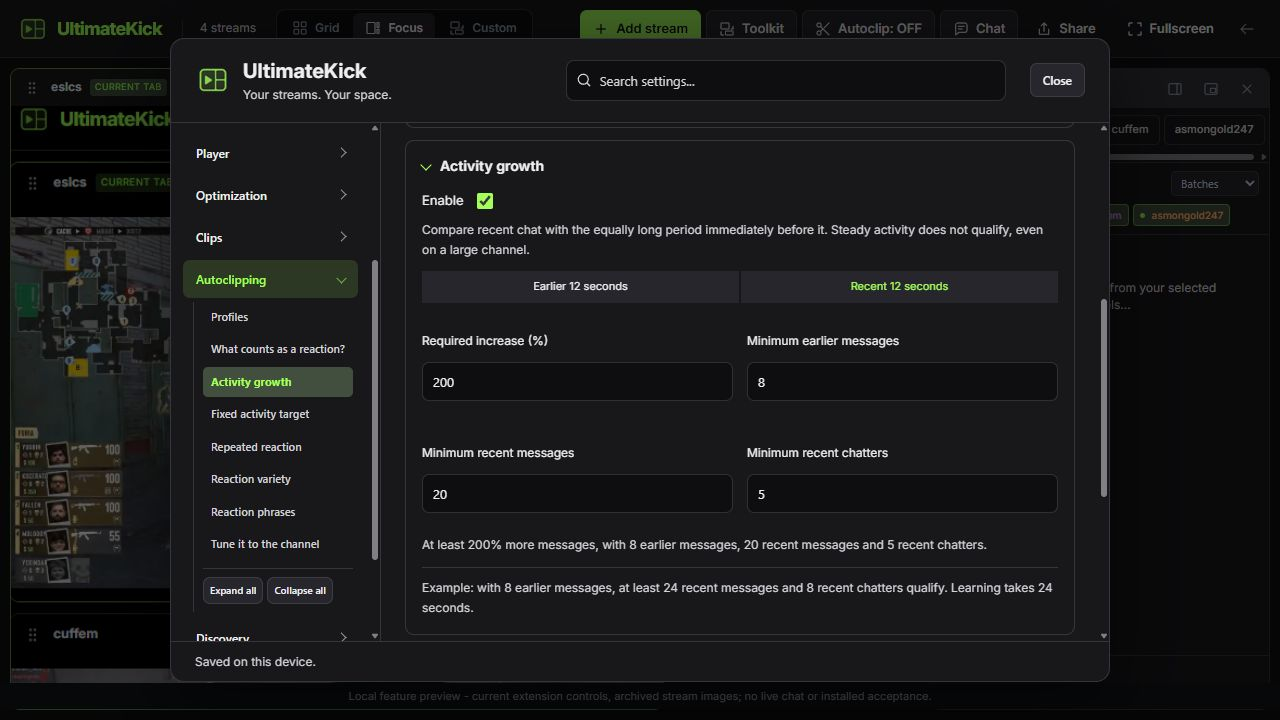
The analysis period is the recent rolling span of chat used by a rule. It is separate from the length of the saved clip. Activity growth compares it with the equally long period immediately before it.
Activity growth: a useful starting rule
- Required increase200% example
- At least three times the earlier message count, not twice.
- Minimum earlier messages8 example
- A baseline floor avoids triggering on a jump from almost nothing.
- Minimum recent messages20 example
- The new period must contain meaningful activity.
- Minimum recent chatters5 example
- Several distinct people must contribute.
 Enlarge
Use other rules deliberately
| Rule | How it qualifies | Watch out for |
|---|---|---|
| Fixed activity target | Minimum recent messages and distinct authors. | A consistently busy chat can qualify repeatedly; new profiles leave this off. |
| Repeated reaction | A literal phrase shared across different authors. | Choose a phrase that signals a moment, not routine chat. |
| Reaction variety | Several configured phrases, each shared by at least two people. | Routine mixed emotes can still be false positives. |
| Trusted commands | An exact command token from configured usernames. | Use channel overrides and give trust carefully. |
!clip Great final roundA configured trusted author can use the exact first token !clip. The remaining text becomes the title. A phrase rule uses whole-word boundaries; omg does not match omgggg.
Profiles, cooldowns and limits
Use a channel profile when different chats need different baselines. Each author's counted messages are capped, duplicate IDs are ignored and a condition must subside before it triggers again. Set per-channel cooldown and hourly limits, plus a shared hourly limit.
Read Diagnostics before lowering thresholds
Check the source
Confirm the intended chat is open, selected and actually receiving new messages.
Check warmup and totals
Wait for both complete periods. Read earlier/recent messages and distinct chatters.
Check the reason
A missing baseline, unmet threshold, cooldown, hourly limit, full queue or busy player can prevent an automatic output.
Change one requirement
Try the adjusted profile in test mode and inspect several results before enabling automatic saving.
Common questions
Does steady activity qualify as growth?
No. A large chat needs a relative increase over its previous period, as well as the baseline, volume and chatter floors.
Can reactions locate the exact video moment?
No. Viewers react after watching. Reaction delay estimates an earlier moment; it is not a video-analysis system.
Why did a repeated phrase count less than expected?
Distinct authors, literal boundaries, author caps and deduplication affect what counts. Initial and restored history are excluded.
Written for version 1.1. Some controls may be unavailable in an earlier installed release. See release notes.