
Five viewer games
Host a timed game in an open chat, show its audience board and keep the answers outside your broadcast capture.
Find it in: Toolkit/Games
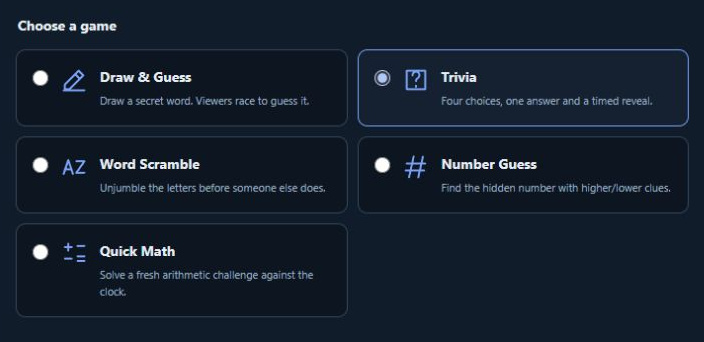
Choose from five games
| Game | How viewers play | Scoring |
|---|---|---|
| Draw & Guess | Guess the secret drawing; up to five guesses each. | First correct answer: 10 points. |
| Trivia | One locked A-D answer each. | Every correct answer: 10 points at round end. |
| Word Scramble | Unjumble a word; up to three guesses each. | First correct word: 10 points. |
| Number Guess | Guess with shared higher/lower clues; up to five guesses each. | First exact guess: 10 points. |
| Quick Math | Solve the arithmetic challenge; up to three guesses each. | First correct integer: 10 points. |
Prepare a session
Choose Game channel
Select an open chat that can supply new messages.
Set rounds and time
Choose 1-20 rounds and 15-180 seconds per round, plus the offered difficulty.
Choose an Answer command
For example, !play. Viewers use that exact command followed by their answer.
Prepare and share the prompt
Use Copy chat prompt and post it yourself. Open audience board for the display you want viewers to see.
 Enlarge
Run rounds and show the board
Use Start round, Pause round, Resume round and End round. Prepare next round when ready. Trivia reveals and scores at round end. Stop session cancels unfinished scoring; closing Toolkit or the audience board alone keeps the session running.
Add your own questions or words
Custom packs are available for drawing, Trivia and Word Scramble. Use one entry per line, up to 100 entries and 32 KiB. Include enough unique entries for the number of rounds. Word Scramble accepts single English words of 3-14 letters.
What is 2 + 2? | 4 | 3 | 5 | 6The choices are shuffled for play. Drawing words can include aliases separated by |. Custom packs and scores stay in this page's memory, outside preference backups.
Use results in a giveaway
Complete all configured rounds, then choose Use game results in Giveaway. Review all participants, a minimum score or tied positive leaders. Games keeps the scoreboard; Giveaways manages tickets and a separate random draw.
Does the extension announce questions automatically?
No. Copy chat prompt and post it yourself, or show the audience board.
Can old messages enter a round?
No. The game uses eligible new messages from the selected open chat.
Does a tied score have a unique rank?
Ties share their rank. A leaders-only giveaway can include all tied positive leaders.
Written for version 1.1. Some controls may be unavailable in an earlier installed release. See release notes.