
Quality & optimization
Balance viewing quality and bandwidth, and choose a separate resolution for saved videos.
Find it in: Toolkit/Optimization
Three separate quality choices
| Setting | Controls |
|---|---|
| Player > Preferred quality | Your regular native playback preference. |
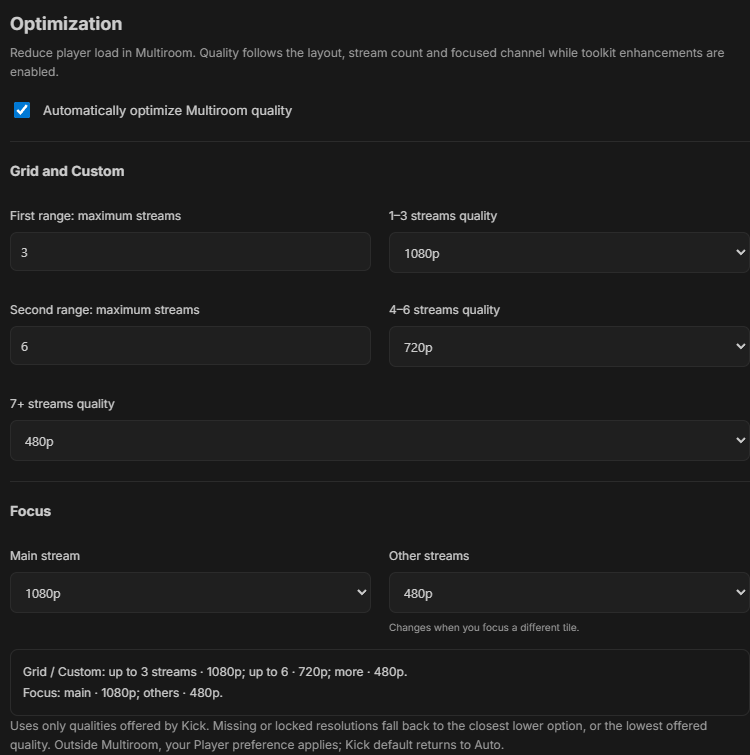
| Optimization | Playback quality of main and smaller Multiroom tiles. |
| Player > Saved video resolution | The source resolution used for replay and video downloads. |
Default Multiroom targets
- Grid / Custom: 1-3 streams1080p
- Larger tiles retain detail.
- Grid / Custom: 4-6 streams720p
- Reduces the cost of several simultaneous players.
- Grid / Custom: 7 or more480p
- Keeps smaller tiles lighter.
- Focus main / previews1080p / 480p
- The selected stream receives the main target.
 Enlarge
Change your targets
Open Optimization
Keep automatic per-player quality enabled, then choose the stream-count thresholds and resolutions that suit your screen and connection.
Change the focused stream
The new main tile receives the main target. Adding or removing streams also recalculates targets.
Choose saved quality separately
In Player, use Current playback, Highest available or a specific resolution under Saved video resolution.
When a resolution is unavailable
Optimization uses an offered quality at or below the target when possible, otherwise the lowest available option. Regular Preferred quality retains native availability. UltimateKick does not unlock subscription-only choices or upscale a source.
Restore regular playback
Disabling Optimization or leaving Multiroom restores the regular Player preference. Kick default returns an optimized player to Auto. Open native quality menus are left for you to finish.
Why did a quality change take a moment?
Kick may mount or replace controls after navigation. Preferences are reapplied when compatible controls become available.
Can I force an unavailable quality?
No. Choose from the qualities offered for that account and source.
Written for version 1.1. Some controls may be unavailable in an earlier installed release. See release notes.